Multi-tenant control panel for Proxmox Give your customers a login, not your cluster.
Cloudmox is a self-hosted, whitelabel portal that gives Proxmox the tenant model it doesn't ship with. Built for service providers, enterprises and IT teams.
- Self-hosted
- Nothing installed on your nodes
- Billed per node
The part Proxmox leaves to you
Proxmox VE runs your infrastructure. Cloudmox adds the layer your customers and colleagues actually work in.
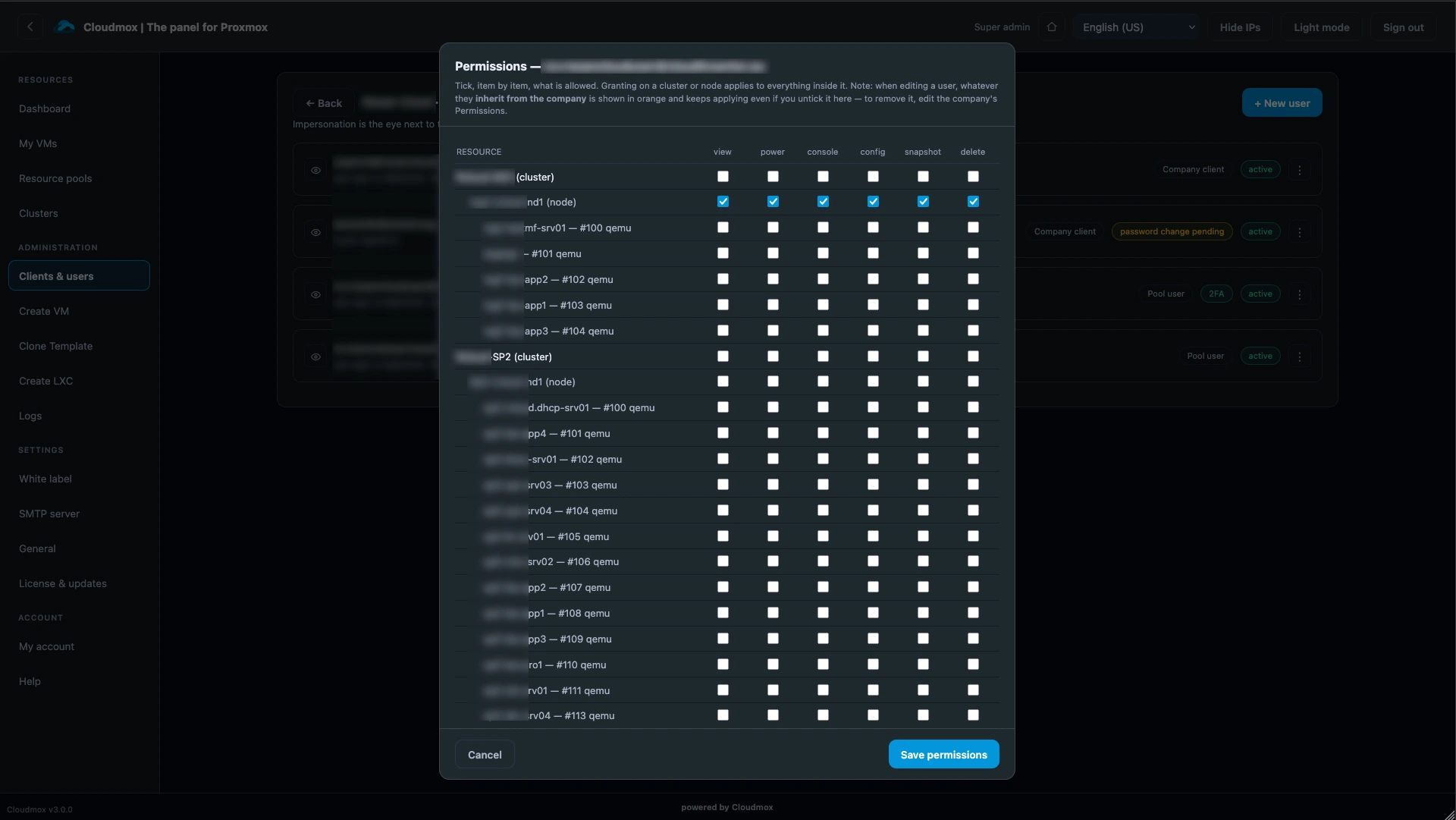
Group rights and delegated access
Give teams and customers exactly the rights they need, per VM, node or cluster. No Proxmox logins handed out.
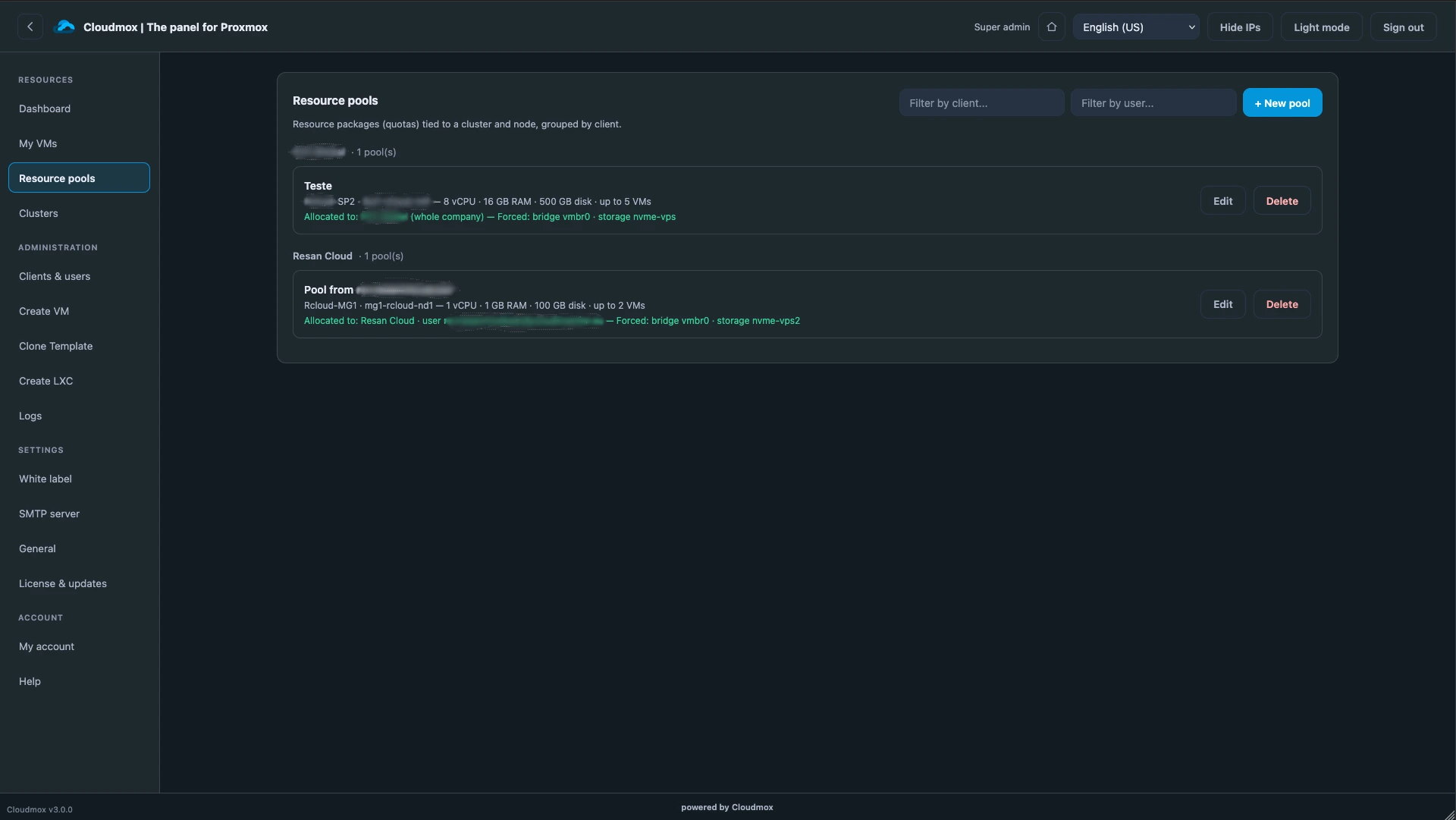
Resource limits per tenant
Assign CPU, RAM and storage per customer. They work freely inside their pool, and never beyond it.
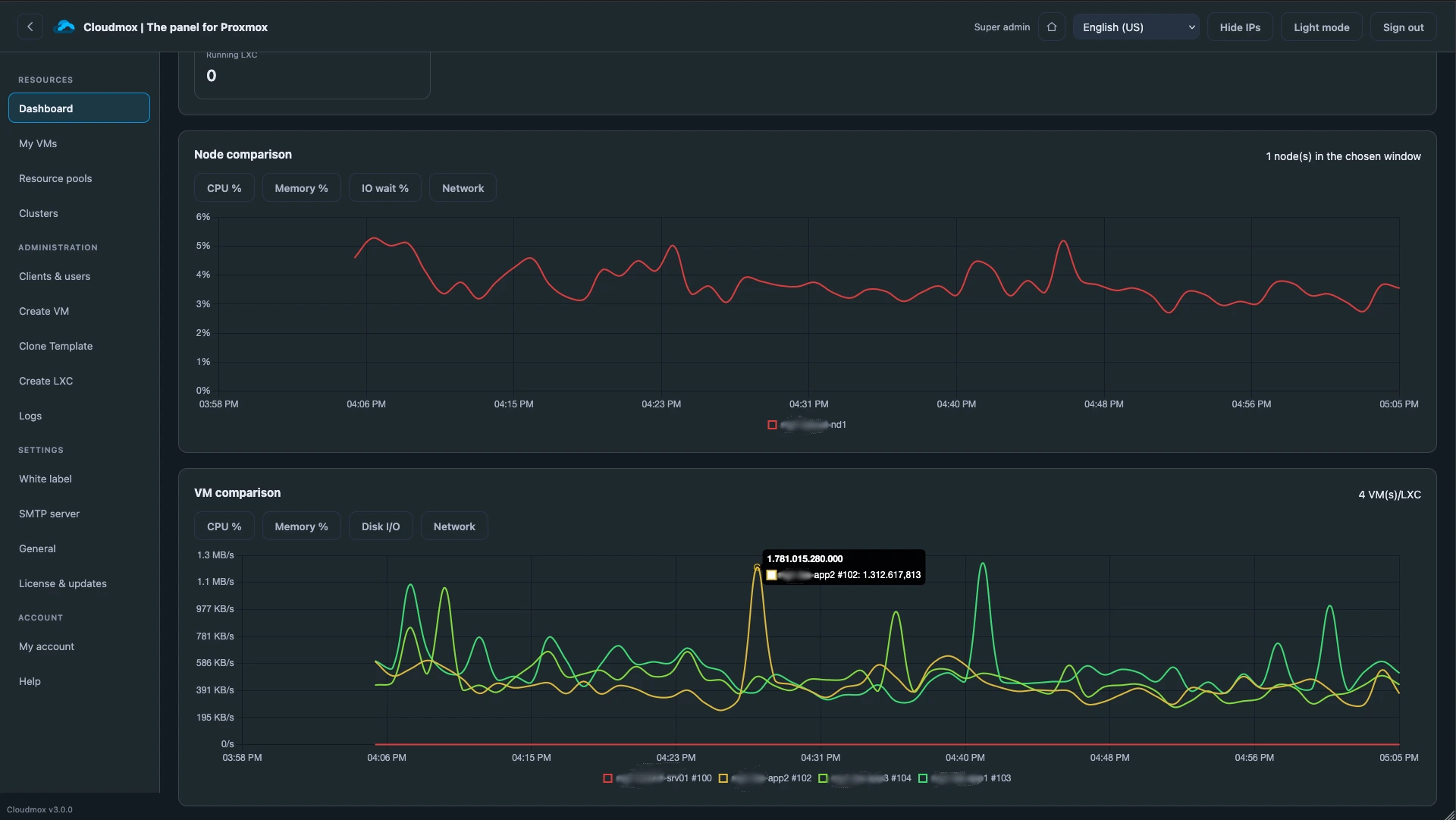
Usage tracking and billing
See what each tenant consumes and invoice it. Built in, with an API for your own billing system.
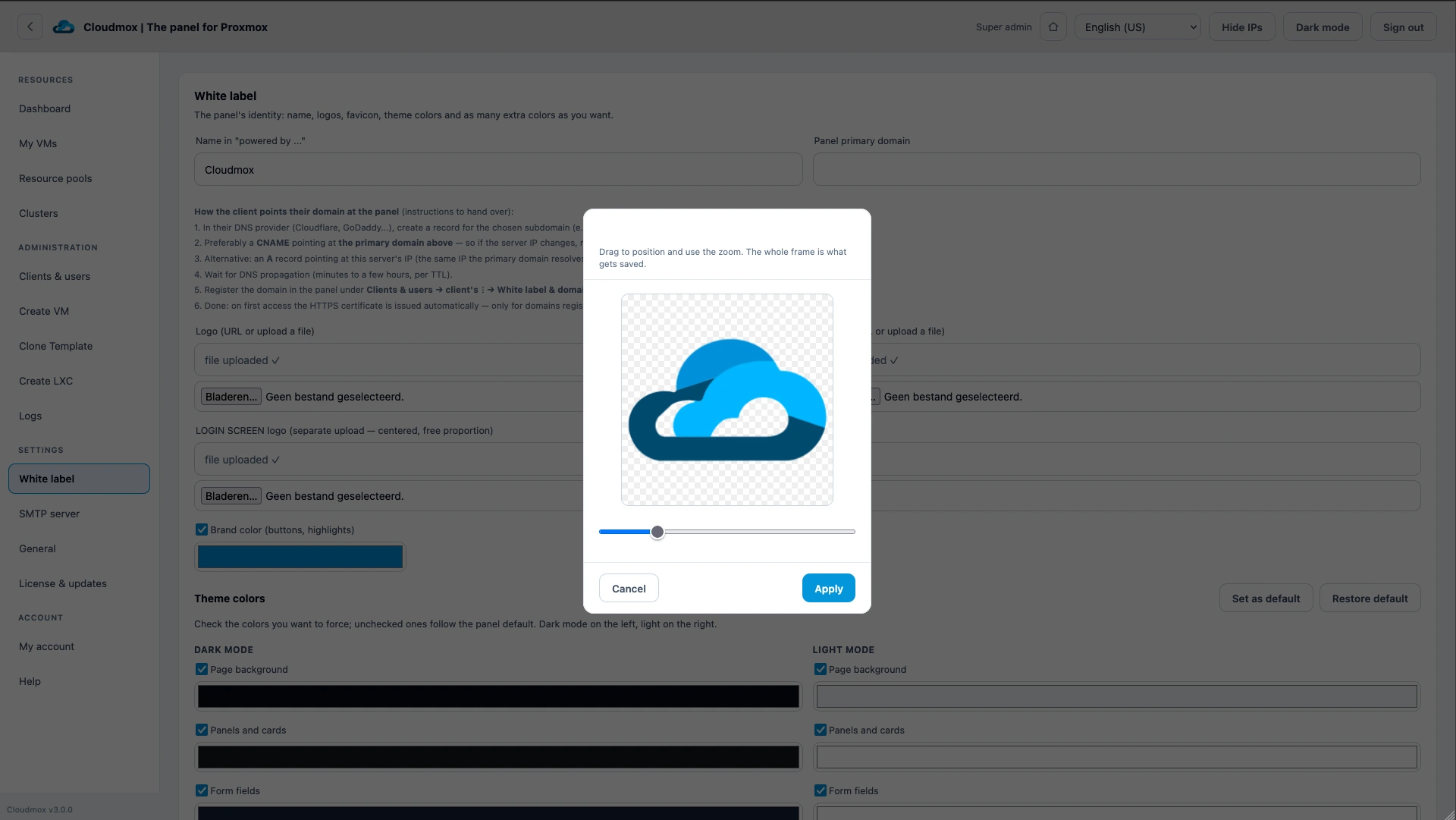
Your own branding
Your colours, logo and URL. Your tenants can apply their own branding for their customers in turn.
Running in three steps
Install Cloudmox
One command on your own Debian or Ubuntu server. Nothing is installed on your Proxmox nodes.
Configure clusters
Add each cluster with an API token and settings. Individual nodes and multiple clusters appear as one environment.
Create tenants
Set up customers or teams, each with their own resource pool, rights and branding.
$ wget https://portal.inov.global/…
# Cloudmox connects over the Proxmox API. Your nodes stay untouched.
Every role gets exactly its own view
Infrastructure is built and used by people with different jobs. Cloudmox shows each of them what they need, and nothing more.
You stay in control. Cloudmox follows.
Moving off VMware?
Proxmox replaces vSphere. Cloudmox replaces the rest: tenant separation, delegated access, self-service and billing.
Do I have to give users access to the Proxmox servers?
No, and that's exactly what you want to avoid. Once a cluster is connected, you manage access and rights to nodes and VMs from within Cloudmox. When an employee leaves, disable their account and all infrastructure is closed to them.
Will our clusters go down if Cloudmox is unavailable?
No. Cloudmox works through the Proxmox API and doesn't change your configuration. Your engineers can always use the Proxmox or Proxmox Datacenter Manager interface. Cloudmox also includes backup and restore, so reinstalling it is quick.
How do I import existing VMs and containers?
You don't need to. Proxmox is the single source of truth: connect a node and all its resources appear. You only assign them to a tenant or user. Changes made directly in Proxmox won't break Cloudmox, and Cloudmox won't break Proxmox.
Can customers create VMs themselves?
Yes. Give them a resource pool, and every VM they create follows your best practices. You decide what they see during creation, including friendly names for networks, storage and ISOs.
Can I host Cloudmox myself?
Yes. It runs on Debian or Ubuntu and installs with one command.
How is Cloudmox billed?
Per node, monthly or yearly, invoiced upfront in euros. Reverse-charge VAT applies, except for customers in the Netherlands. You can add nodes at any time and use them immediately. We don't charge per user, VM or tenant, or for help with configuration.
See Cloudmox on your own cluster
Billed per node. No charge per user, VM or tenant.
Multi-tenant control panel for Proxmox Give your customers a login, not your cluster.
Cloudmox is a self-hosted, whitelabel portal that gives Proxmox the tenant model it doesn't ship with. Built for service providers, enterprises and IT teams.
- Self-hosted
- Nothing installed on your nodes
- Billed per node
The part Proxmox leaves to you
Proxmox VE runs your infrastructure. Cloudmox adds the layer your customers and colleagues actually work in.
Group rights and delegated access
Give teams and customers exactly the rights they need, per VM, node or cluster. No Proxmox logins handed out.
Resource limits per tenant
Assign CPU, RAM and storage per customer. They work freely inside their pool, and never beyond it.
Usage tracking and billing
See what each tenant consumes and invoice it. Built in, with an API for your own billing system.
Your own branding
Your colours, logo and URL. Your tenants can apply their own branding for their customers in turn.
Running in three steps
Install Cloudmox
One command on your own Debian or Ubuntu server. Nothing is installed on your Proxmox nodes.
Configure clusters
Add each cluster with an API token and settings. Individual nodes and multiple clusters appear as one environment.
Create tenants
Set up customers or teams, each with their own resource pool, rights and branding.
$ wget https://portal.inov.global/…
# Cloudmox connects over the Proxmox API. Your nodes stay untouched.
Every role gets exactly its own view
Infrastructure is built and used by people with different jobs. Cloudmox shows each of them what they need, and nothing more.
You stay in control. Cloudmox follows.
Moving off VMware?
Proxmox replaces vSphere. Cloudmox replaces the rest: tenant separation, delegated access, self-service and billing.
Do I have to give users access to the Proxmox servers?
No, and that's exactly what you want to avoid. Once a cluster is connected, you manage access and rights to nodes and VMs from within Cloudmox. When an employee leaves, disable their account and all infrastructure is closed to them.
Will our clusters go down if Cloudmox is unavailable?
No. Cloudmox works through the Proxmox API and doesn't change your configuration. Your engineers can always use the Proxmox or Proxmox Datacenter Manager interface. Cloudmox also includes backup and restore, so reinstalling it is quick.
How do I import existing VMs and containers?
You don't need to. Proxmox is the single source of truth: connect a node and all its resources appear. You only assign them to a tenant or user. Changes made directly in Proxmox won't break Cloudmox, and Cloudmox won't break Proxmox.
Can customers create VMs themselves?
Yes. Give them a resource pool, and every VM they create follows your best practices. You decide what they see during creation, including friendly names for networks, storage and ISOs.
Can I host Cloudmox myself?
Yes. It runs on Debian or Ubuntu and installs with one command.
How is Cloudmox billed?
Per node, monthly or yearly, invoiced upfront in euros. Reverse-charge VAT applies, except for customers in the Netherlands. You can add nodes at any time and use them immediately. We don't charge per user, VM or tenant, or for help with configuration.
See Cloudmox on your own cluster
Billed per node. No charge per user, VM or tenant.
Screenshots


Some of our partners


